LookDev
The complete HDRI lighting studio for Maya. Browse your entire library, preview in real-time, manage lighting states, automate render passes, and control every light — from one dockable Maya-native panel.
- Environment browser with HDRI thumbnails, search, filter by category/format
- Create Lights tab — flat-panel geometry light rig builder
- Automation tab — batch operations, render queue
- Production + Light Settings + Lighting States tabs
- Interactive Sun Direction compass widget
- Realtime Preview Lighting with Viewport RT toggle
- V-Ray for Maya light creation and compatible scene-light management
- Version-specific packages for supported Maya releases
Choose your Maya version
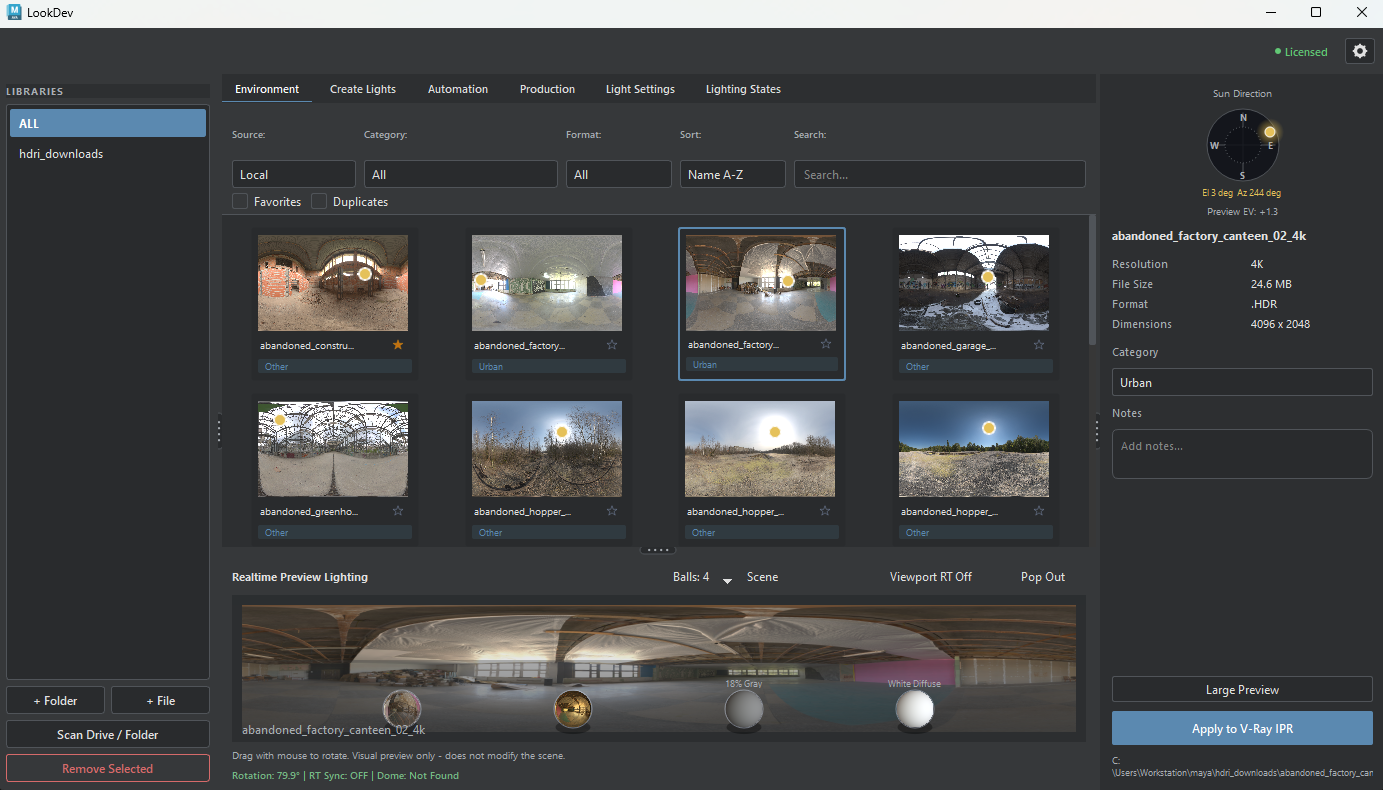
What it does
LookDev replaces the chaotic workflow of manually navigating folders, drag-dropping HDRIs, and switching between renderer settings. Everything lives in one panel you can dock anywhere in Maya.
The Lighting States system is particularly powerful — you can save your entire lighting setup (HDRI rotation, intensity, all area lights) as a named state and switch between setups with one click.
Who it's for
Arch-viz artists, VFX lighting TDs, and any Maya user who works with HDRI lighting regularly. If you spend more than 10 minutes per shot setting up lighting, LookDev pays for itself in the first session.
Installation Guide
- 1Download the
.zipfrom the secure link sent after purchase. - 2Extract to any permanent location (e.g.
C:/Maya/scripts/LookDev/) - 3In Maya, open the Script Editor and run the installer script included in the zip.
- 4A shelf button is created automatically. Click it to open the panel.
- 5On first launch, enter the license key from your purchase receipt email.
Supported Versions
- Redesigned the LookDev interface with a darker Maya-native visual system
- Added live Maya Dark and Maya Standard theme switching
- Rebuilt License Information as a clean read-only status dialog
- Fixed the small ghost window that could appear while switching tabs
- Reduced duplicate borders and aligned spacing, buttons and information panels
- Cleaned the release package and removed retired development modules
LookDev FAQ
Product-specific answers about Maya compatibility, renderers, installation, HDRI libraries and licensing.
Which Maya versions are supported?
LookDev supports Maya 2025 and Maya 2026 on Windows. Install the package that matches your Maya version.
Which renderers work with LookDev?
V-Ray for Maya is supported throughout the complete light-creation workflow. Light Settings can also identify and manage compatible scene lights exposed by supported renderer integrations.
Is LookDev available for macOS or Linux?
The currently tested and supported release is for Windows 10 and Windows 11. macOS and Linux support are not advertised for this version.
Are HDRI files included with the plugin?
The $49 Early Access purchase is for the LookDev plugin. It scans, previews and organizes HDRI files from folders you add; no third-party HDRI library is advertised as part of the purchase.
How is the plugin installed in Maya?
Close Maya, extract the package, and run the included installer for the matching Maya version. The installer copies LookDev into the Maya user scripts folder and creates the LookDev shelf.
Does LookDev require a permanent internet connection?
Local HDRI library management does not require a permanent connection. Poly Haven access and production license activation require network access when those services are used.
Are product updates included?
Yes. Every LookDev update through the stable 1.0 release is included with the Early Access purchase at no additional cost. Any later paid major upgrade will be identified clearly in advance.
Questions about payment, receipts, refunds or customer support? Visit the General FAQ →